[Oracle RAC 12.1 Installation on Oracle Linux 6.7 (ISCSI + ASM)]: Environment description for Oracle RAC installation
RAC looks approximately like this:
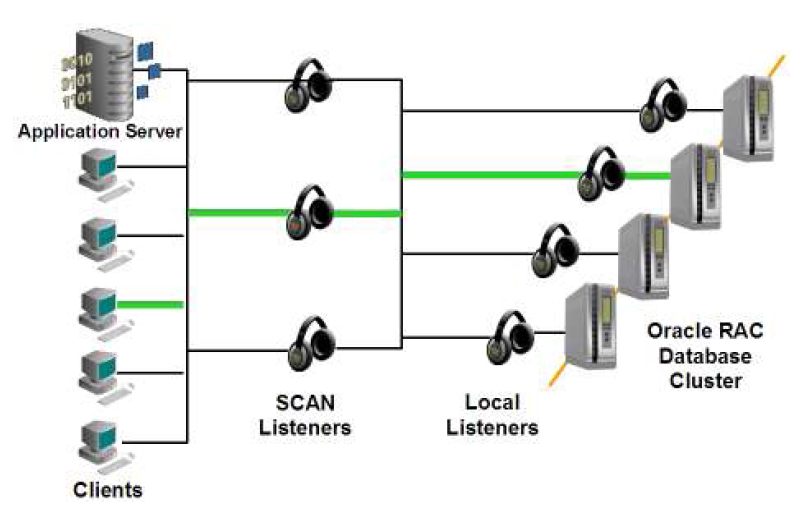
This document provides an example of deploying Oracle Real Application Cluster 12.1 using 4 virtualbox virtual machines.
- Cluster nodes: rac1, rac2
- Shared storage server: storage
- DNS server: dnsserv
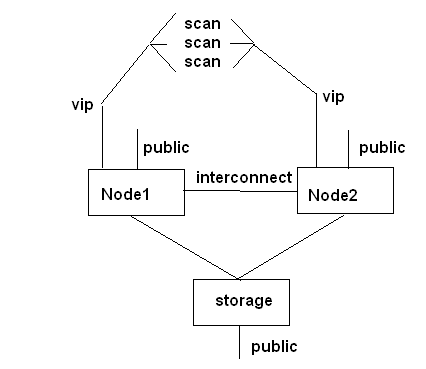
- 2 virtual machines are used as cluster nodes. They have Oracle software installed: Oracle Grid and Oracle Database Software
- 1 virtual machine acting as a data storage, whose disks are mounted in the cluster nodes' file system via Network File System (NFS).
- 1 virtual machine is used as a DNS server. SCAN addresses must be configured in DNS. Otherwise, errors may occur or RAC may not install correctly.
Oracle Linux 6.7 is used as the operating system on the virtual machines.
Each cluster node has 4.5 GB (minimum 2 GB) of RAM. The Storage and DNS server can be allocated significantly less.
Each cluster node has 2 hard disks of 40 GB each, storage has 8 disks, also 40 GB each. Disks are expandable as needed, i.e., they actually occupy less if the specified space is not used.
The cluster nodes have 3 network adapters each. Storage needs 2 network adapters, DNS server needs 1.
- eth0 – public
- eth1 – interconnect (for communication between cluster nodes)
- eth2 – private (for communication between cluster nodes and external storage)
For RAC installation, it is necessary to allocate IP addresses in one subnet:
- 1 public IP for each node (just to connect to the server and perform administration tasks)
- 1 vip IP for each node ((in the same subnet as public) it is recommended that vip addresses are configured in DNS)
- 3 IP addresses for SCAN ((in the same subnet as public) must be configured in DNS (otherwise errors will occur during installation). The client connects to the SCAN address, which redirects the request to the vip address active on the cluster node)